MCP Integration
Connect AI assistants directly to your Clarity workspace with the Model Context Protocol.
The Model Context Protocol (MCP) is an open standard developed by Anthropic that lets AI assistants interact with external tools and services through a unified interface. Clarity implements an MCP server that gives AI clients direct access to your workspace — no copy-pasting, no context switching.
Supported clients
Clarity works with any MCP-compatible client, including:
- Claude Desktop — Anthropic's desktop app for Claude
- Cursor — AI-first code editor
- Windsurf — Codeium's AI editor
- Claude Code — Anthropic's CLI agent
- Any client that supports the MCP
stdiotransport
What can MCP do?
With MCP enabled, your AI assistant can:
- Browse your workspace — list all projects and explore file trees
- Read files — view the content of any file in a project
- Write files — update existing files with new content
- Create files — add new
.tex,.typ,.bib,.sty, and other files - Delete files — remove files with built-in safety checks (cannot delete main files or non-empty folders)
- Compile documents — build LaTeX and Typst projects and get the result
- Debug errors — get structured error analysis with suggested fixes when compilation fails
- Search Typst docs — look up syntax, functions, and patterns from the built-in Typst documentation library
- Read Typst docs — read full documentation pages for detailed reference
- Generate TikZ illustrations — create professional diagrams, flowcharts, and figures
All from a single chat conversation. Ask your AI to "fix the compilation error in chapter 3" and it will read the file, diagnose the issue, apply the fix, and recompile — automatically.
What MCP cannot do
MCP access is scoped to file-level operations within your existing projects:
- Cannot create or delete entire projects
- Cannot rename or move files between folders
- Cannot upload binary files (images, PDFs, fonts)
- Cannot access other users' projects or data
- Cannot modify your account settings, billing, or profile
- Cannot share or publish projects
- Cannot manage collaborators or permissions
How it works
Clarity exposes an MCP server with 11 tools that communicates with AI clients via the standard stdio transport:
- 1You generate an API key in Clarity Settings → MCP / API
- 2You add Clarity as an MCP server in your AI client's config
- 3The AI client launches the Clarity MCP server as a local subprocess
- 4The server authenticates with your API key and proxies requests to the Clarity API
- 5Your AI assistant calls tools like
read_file,write_file, andcompileas needed
The MCP server is a lightweight Node.js process — it uses no resources when idle and starts in under a second. Your API key is read from the environment at startup and never stored on disk by the server.
Architecture
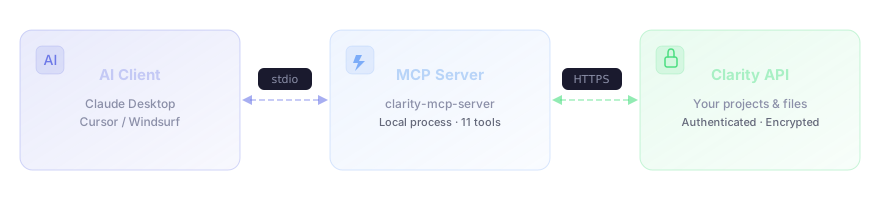
Every request is authenticated with your API key, and every operation verifies that you own the requested resource. See the security docs for details on how keys are hashed and stored.
Get started
- Setup Guide — step-by-step instructions for Claude Desktop, Cursor, and other clients
- Tools Reference — detailed documentation for all 11 MCP tools
- API Keys & Security — how keys work, safety practices, and what's protected